
SEI Statistics Function User Manual

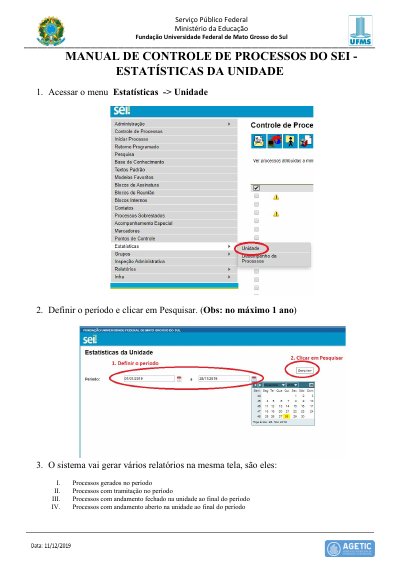
this document describes how to use SEI's statistics function to view the process status of a unit in a certain time period

SEI Statistics Function User Manual - cover page
Category
Other software
Document type
Other
Language
Portuguese
Pages
3
File format
PDF
File size
455 KB
Published
03 November, 2023
Updated
03 November, 2023
MD5 checksum
AA30F79CB48CB8EEC44F152FD0C4CF5D

About this manual

This guide provides instructions for accessing the Statistics menu in the SEI (Sistema Eletrônico de Informações) system. Users are directed to select the 'Unit' option and define a time period of up to one year to generate various reports. This manual is written in Portuguese.

What's inside

  • Acessar o menu Estatísticas
  • Definir o período
  • Relatórios gerados
  • Processos abertos
  • Processos fechados
  • Verificação de tipos de processos

Frequently asked questions

What is the maximum time period allowed for generating statistics reports?

The system allows a maximum period of one year for generating reports.

How can a user view a list of open processes for a specific type?

Click on the quantity of the process type to open a pop-up with the list.

How do you access a specific process from the report?

Click on the process number to open it.

Download PDF (455 KB)

Also Manuals