
This is a guidance manual on how students can use SEI for electronic submission.
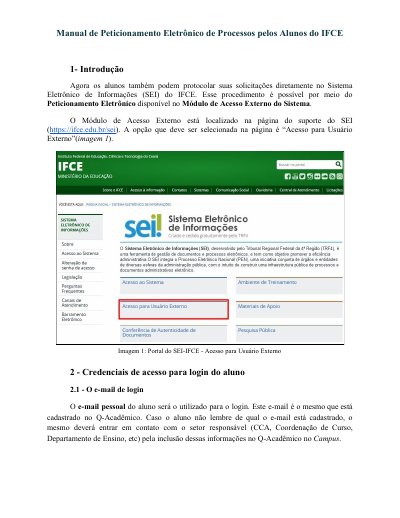
This manual, published by the Instituto Federal de Educação, Ciência e Tecnologia do Ceará (IFCE), explains how students file requests electronically through the external user module of SEI (Sistema Eletrônico de Informações). The text describes SEI as a document and process management tool developed by the Tribunal Regional Federal da 4ª Região (TRF4) and integrated into the national electronic process network.
The document walks through the login credentials, requesting a first password and changing it, the basic requirements for filing (separate PDF files of up to 50 MB, scanning at 300 dpi), opening a new process with the type "Aluno: Requerimento Geral", filling in specification, campus city and interested party, adding complementary documents, concluding the filing with an electronic signature, and obtaining the electronic protocol receipt. This manual is written in Portuguese.
| Accepted document file format | |
|---|---|
| Maximum file size | 50 MB |
| Scanning resolution for paper documents | 300 dpi, grayscale or black and white |
| Specification field | Summary of the subject, limited to 50 characters |
The student's personal email, the same one registered in Q-Acadêmico. If the student does not remember it, they should contact the responsible sector to have the information included.
The access password must be requested at the student's first access by clicking "Esqueci minha senha" and entering the login email address; the password is generated automatically and sent to the registered email.
The student should choose the process type "Aluno: Requerimento Geral" and then read the specific instructions for the selected type.
Follow-up can be done in the SEI Public Search using the process number and/or by the interested party.