
TM100 Cloner Quick Start Guide

TM100 cloner quick guide

TM100 Cloner Quick Start Guide - cover page
Category
Automotive supplies
Document type
Quick Start Guide
Language
English
Pages
2
File format
PDF
File size
463 KB
Published
31 October, 2023
Updated
31 October, 2023
MD5 checksum
D0B0D74D68EF6D26791DD404710B2F30

About this manual

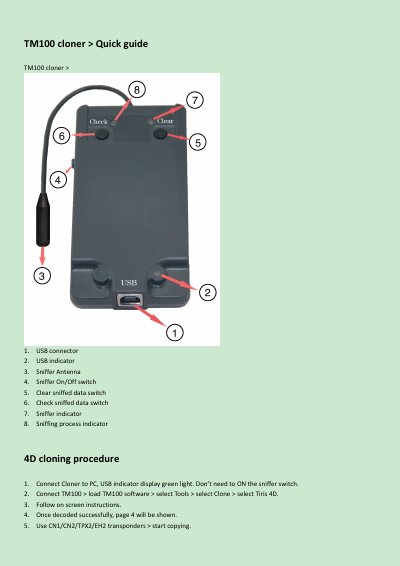
The TM100 Cloner Quick Start Guide describes the cloner’s front-panel parts, including the USB connector, indicators, sniffer antenna, and switches for sniffing and clearing data.

It provides step-by-step 4D and 46 cloning procedures, including connecting to a PC, using TM100 software, sniffing original transponders near the ignition, and copying to supported transponders.

What's inside

  • Quick guide
  • 4D cloning procedure
  • 46 cloning procedure
  • USB connector
  • Sniffer Antenna
  • Sniffer On/Off switch
  • Clear sniffed data switch
  • Check sniffed data switch
  • Sniffer indicator
  • Sniffing process indicator

Frequently asked questions

What are the steps for 4D cloning?

Connect the cloner to a PC, connect TM100, load the TM100 software, select Tools > Clone > Tiris 4D, follow on-screen instructions, then copy to CN1/CN2/TPX2/EH2 transponders.

Which transponders are used for 46 cloning?

YS21, GMT46, and CN3 transponders are used for 46 cloning.

What does a green light mean when checking sniffed data?

A green light indicates that previous data is present and needs to be cleared.

Download PDF (463 KB)

Also Manuals