
VACON NX QUICK HELP Start-up wizard user manual
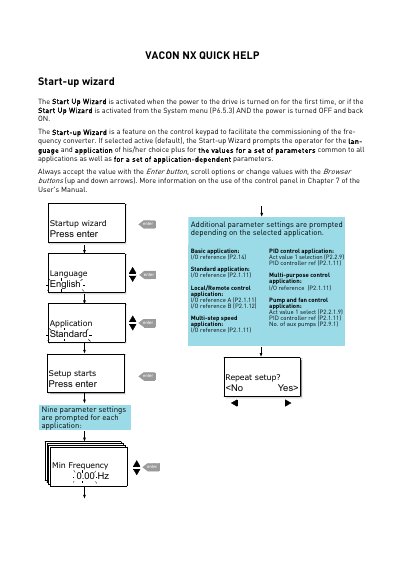
This manual explains how to use the Start-up Wizard to configure the Vacon NX inverter for different applications. It covers language and application selection, parameter setup, and fault code monitoring. The document also details how to use the control panel for quick operations and how to switch control between keypad, I/O, and fieldbus.
| Min Frequency | 0.00 Hz |
|---|---|
| Output Frequency | Hz |
| Motor Speed | rpm |
| Motor Current | A |
| Motor Voltage | V |
It is activated when power is turned on for the first time, or from the System menu (P6.5.3) after power is cycled.
Go to System Menu (M6), enter Language selection (S6.1), browse and select with Enter.