
This document is a user manual for the Curlin 6000 CMS Infusion Pump, which describes the steps and precautions for using the device
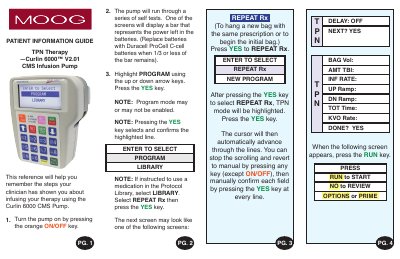
This document serves as a reference guide for clinicians using the Curlin 6000 CMS Infusion Pump. It outlines the steps for turning the pump on, selecting programs from the library, and managing infusion therapies such as TPN. The manual details how to navigate the pump's interface using arrow keys and confirmation buttons.
Replace batteries with Duracell ProCell C-cell batteries when 1/3 or less of the bar remains.
A green light blinks when the pump is running, a yellow light when paused, and a red light when there is an alarm.
Read the alarm, press the PAUSE key, resolve the alarm, then press YES to RESUME and RUN to start.