
This file introduces the use of KIP Color Density Calculator, including how to use X-rite Density Checker software for density measurement and how to use the calculator in Excel for density calibration.
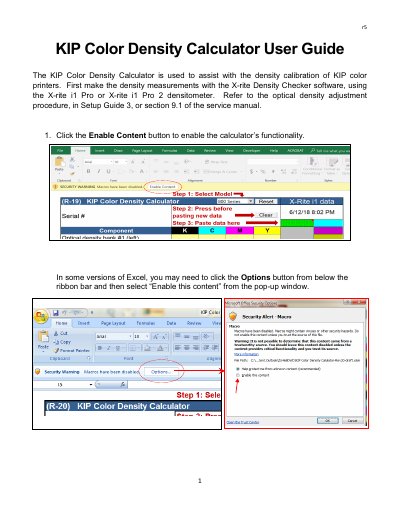
The KIP Color Density Calculator assists with density calibration of KIP color printers. It works with measurements from the X-Rite Density Checker software using an X-Rite i1 Pro or i1 Pro 2 densitometer. Users enable content in Excel, select their printer model, paste density values, and adjust developer bias values until all cells turn green.
After each adjustment round, pressing Clear updates the calculator for new measurements. A Reset button restores starting values. Orange values are acceptable for a final confirmation check.
| Compatible Densitometer | X-Rite i1 Pro or i1 Pro 2 |
|---|---|
| Required Software | X-Rite Density Checker, Microsoft Excel |
Click the Enable Content button, or in some Excel versions click Options below the ribbon and select Enable this content.
The calculator assists with density calibration of KIP color printers.
Density measurements require the X-rite Density Checker software and an X-rite i1 Pro or i1 Pro 2 densitometer.
Click the Enable Content button; in some Excel versions, click Options below the ribbon and select "Enable this content".