
Thank you for purchasing NEC “SL1100” system. Due to the flexibility built into the system, your Dialing Codes and Feature Capacities may differ from those in this guide. Check with your Supplier / System Administrator and make a note of any differences.
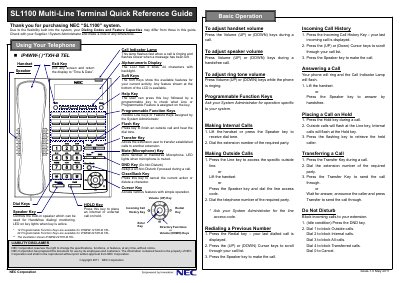
This guide explains how to use the NEC SL1100 multi-line terminal, including dialing, holding, transferring, and muting calls. It also covers adjusting volumes and managing call history. Key features include programmable function keys and soft keys for navigating features.
The guide notes that dialing codes and feature capacities may vary based on system configuration and advises checking with the system administrator for specific details.
Press the Hold key during a call. Outside calls will flash at the Line key, internal calls at the Hold key. Press the flashing key to retrieve the caller.
Press the Transfer Key during a call, dial the extension number, then press Transfer Key to send the call through.
Press the Volume (UP) or (DOWN) keys during a call to adjust the handset volume.
The DND key sets Do Not Disturb mode. Press it during a call to block incoming calls; dial 1 for outside calls, 2 for internal, 3 for all, 4 for transferred, or 0 to cancel.