
How to install VS Omni
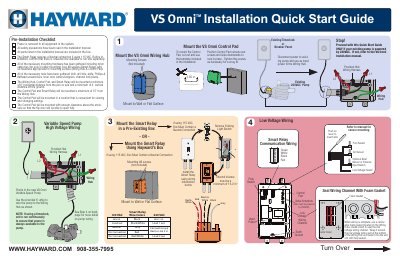
This document serves as a quick start guide for the installation of the Hayward VS Omni pool controller system. It outlines pre-installation requirements, such as ensuring power is removed and gathering necessary tools and hardware. The guide specifies mounting locations for the Wiring Hub, Control Pad, and Smart Relay, noting minimum distances from pools and maximum distances between components.
| Input Voltage | 230VAC |
|---|---|
| Minimum Horizontal Distance from Pool | 6 feet |
| Minimum Vertical Distance from Ground | 4 feet |
| Maximum Distance between Control Pad and Wiring Hub | 15 feet |
| Minimum Internal Volume for Smart Relay | 16.2 in3 |
The Wiring Hub, Control Pad, and Smart Relay must be mounted a minimum of 6 feet horizontal distance from the pool or spa.
Yes, a neutral connection is required if using 115 VAC power.