
DIRECTV Carryout Automatic Antennas Setup Guide

This document describes how to set up a DIRECTV receiver with a Winegard Carryout automatic antenna.
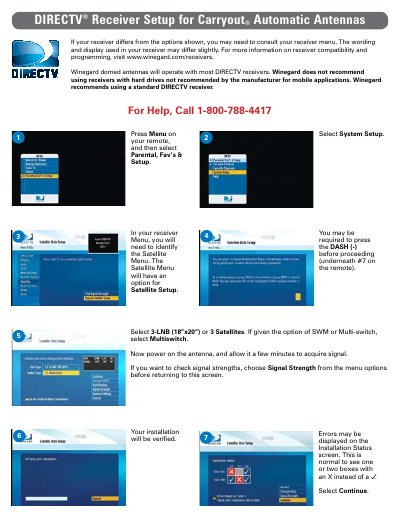

DIRECTV Carryout Automatic Antennas Setup Guide - cover page
Brand
DirecTV
Document type
User Manual
Language
English
Pages
2
File format
PDF
File size
196 KB
Published
08 August, 2012
Updated
30 September, 2023
MD5 checksum
BE7C577219E3AC5A89C6F7030AD4DEC1

About this manual

This guide provides step-by-step instructions for configuring a standard DIRECTV receiver to work with Winegard domed antennas. It covers navigating the receiver's System Setup menu to select the correct satellite configuration (3-LNB or Multi-switch) and initiating the antenna power-on sequence.

What's inside

  • Receiver Compatibility
  • System Setup Menu
  • Satellite Selection
  • Signal Strength Check
  • Installation Status Verification
  • Program Guide Download

Frequently asked questions

Which receiver is recommended for use with Winegard antennas?

Winegard recommends using a standard DIRECTV receiver.

What should be selected in the Satellite Menu if given the option of SWM or Multi-switch?

You should select Multi-switch.

What does it mean if boxes with an X appear on the Installation Status screen?

It is normal to see one or two boxes with an X instead of a / during verification.

Download PDF (196 KB)

More DirecTV Manuals


View all DirecTV manuals →