
This document introduces the DIRECTV® TR-6018 receiver setup method, including system setup, signal strength, satellite setup, signal indicator, and dish pointing.
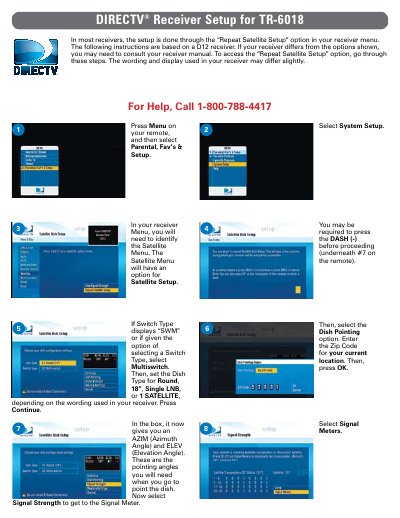
This guide provides step-by-step instructions for performing a repeat satellite setup on the DIRECTV TR-6018 receiver. It details how to navigate the receiver menu to access the 'Repeat Satellite Setup' option and enter specific system parameters such as the switch type and dish configuration. Users are instructed to input their zip code and select the appropriate dish type (e.g., Round, 18", Single LNB) to proceed with the configuration.
Press Menu on your remote, select Parental, Fav's & Setup, then go to System Setup.
Verify the setup by checking the signal strength on all transponders and select Done.