
This document describes how to connect Winegard antennas to DIRECTV receivers
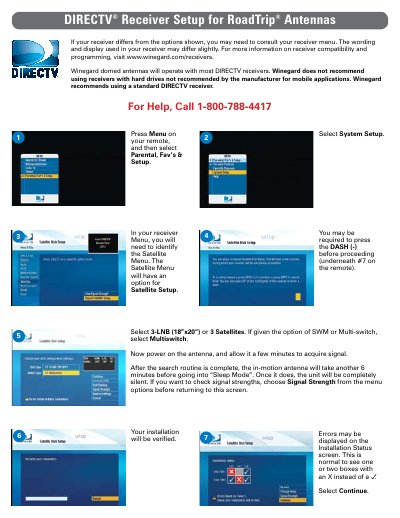
This document provides instructions for configuring a standard DIRECTV receiver to work with Winegard RoadTrip domed antennas. It covers initial setup procedures, such as selecting the correct satellite configuration (3-LNB or Multi-switch) and allowing time for signal acquisition after powering on the antenna.
The guide details the steps within the receiver's menu system to identify satellites, run installation status checks, and download program guides. It also notes that specific wording may vary by receiver model and advises consulting the manufacturer's website for compatibility information regarding receivers with hard drives.
Users should select '3-LNB (18”x20”) or 3 Satellites' and choose 'Multiswitch' if given the option of SWM or Multi-switch.
After powering on the antenna, allow a few minutes to acquire signal; once complete, the in-motion antenna takes another 6 minutes before entering 'Sleep Mode'.