
DIRECTV SK-3005 Receiver Setup Guide

This document provides instructions for setting up the DIRECTV® Receiver for SK-3005, including information on satellite setup and receiver configuration.

DIRECTV SK-3005 Receiver Setup Guide - cover page
Brand
DirecTV
Category
Television
Document type
User Manual
Language
English
Pages
2
File format
PDF
File size
194 KB
Published
08 August, 2012
Updated
28 September, 2023
MD5 checksum
0867D18169C6E8CF67B5EA930CF9DB11

About this manual

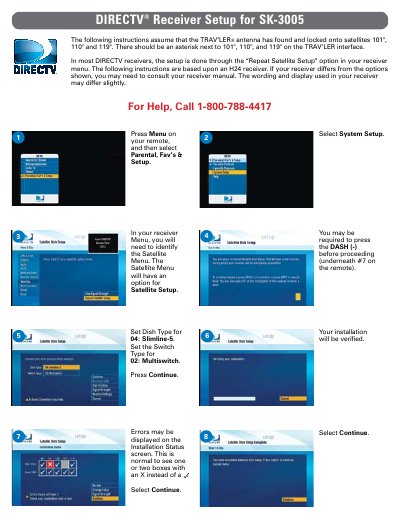
This guide provides step-by-step instructions for configuring the DIRECTV SK-3005 receiver. It covers navigating the menu system to select system setup options and verifying the installation status. The process assumes the TRAV'LER antenna has successfully locked onto satellites 101°, 110°, and 119°.

What's inside

  • System Setup
  • Satellite Menu
  • Dish Type
  • Switch Type
  • Installation Verification
  • Data Feed Test
  • Guide Feed Test
  • Remote Setup

Frequently asked questions

Which satellites must the TRAV'LER antenna lock onto before starting the setup?

The instructions assume the antenna has found and locked onto satellites 101°, 110°, and 119°.

What Dish Type and Switch Type settings are required for this receiver?

You must set the Dish Type for 04: Slimline-5 and the Switch Type for 02: Multiswitch.

What happens after the receiver runs the Data Feed and Guide Feed Tests?

The program guide will download, and you must press Continue when the status bar reaches 100%.

Download PDF (194 KB)

More DirecTV Manuals


View all DirecTV manuals →