
This document describes how to set up a TR-6018 receiver, including clearing previous settings, connecting the antenna, entering the zip code and satellite type, and pointing the dish.
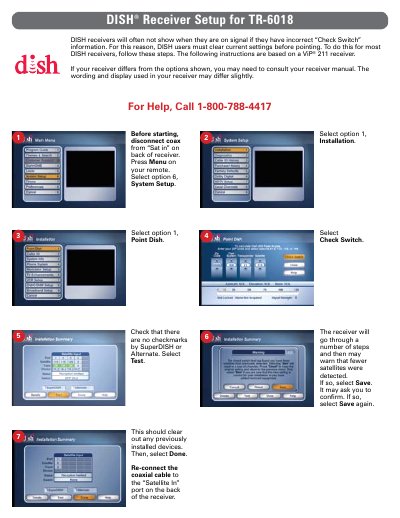
This guide provides step-by-step instructions to clear previous settings on a DISH receiver before pointing a new satellite dish. It details how to navigate the System Setup menu, disable check switches, and save changes to prepare for installation.
The document explains how to enter location data (zip code) and select the correct satellite (Satellite 119) and transponder settings. It includes steps to record azimuth and elevation angles from the display and complete the final signal acquisition process.
The guide specifies that Satellite 119 is the primary satellite and Transponder 11 should be used.
Users must disconnect the coaxial cable, navigate to System Setup > Installation > Check Switch, and select Test.