
The DI SH-HD is a high-quality, high-definition display that offers a wide range of features and benefits for users. It is equipped with a 55-inch LED screen that provides stunning visuals, and it also features a variety of connectivity options, including HDMI, USB, and VGA. The DI SH-HD is perfect for users who want a high-quality display that offers a variety of features and benefits.
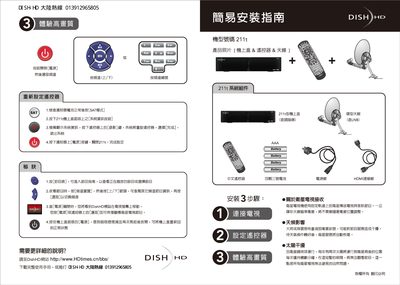
The manual guides users through the easy installation of the Dish HD 211t, covering connection of the antenna, power supply, HDMI and USB ports, and initial configuration steps. It also explains how to use the remote control for channel selection and SAT mode operation.
Additional sections describe the front and rear panel layouts, battery requirements, safety warnings, and troubleshooting tips, helping technicians and end‑users maintain proper operation of the receiver. This manual is written in Chinese.
| Power Input Voltage | 100‑240 V AC |
|---|---|
| Power Frequency | 50‑60 Hz |
| USB Port | USB 2.0 |
Use the up/down channel keys on the remote to switch channels.
After confirming the battery is normal, select SAT mode and follow the on‑screen prompts to reset the unit.