
This document is the user manual for DISH ® Receiver Setup for Carryout® Automatic Antenna, which introduces how to set up the antenna system and receiver.
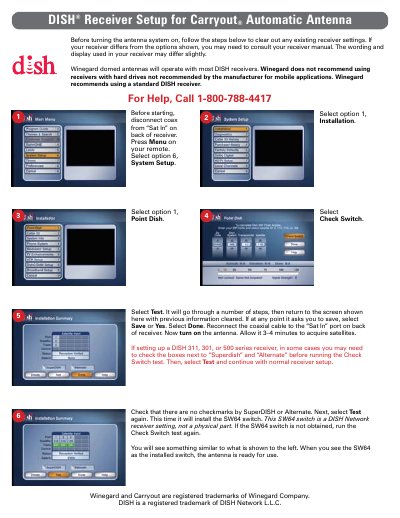
This document provides setup instructions for the Winegard Carryoute automatic antenna. It details how to clear existing receiver settings before installation, including disconnecting coaxial cables and navigating menu options on compatible DISH receivers.
The guide explains the process of running a 'Check Switch' test to install the necessary SW64 switch setting within the receiver software. It also notes specific requirements for certain DISH receiver series (311, 301, 500) regarding 'Superdish' and 'Alternate' options.
Winegard recommends using a standard DISH receiver and does not recommend using receivers with hard drives not recommended by the manufacturer.
After reconnecting the coaxial cable and turning on the antenna, allow it 3-4 minutes to acquire satellites.
If the SW64 switch is not obtained, you need to run the Check Switch test again.