
This guide provides information about the lamps for Proxima C110, C160, C180 projectors, including lumens, lamp life, checking lamp hours and resetting lamp hours
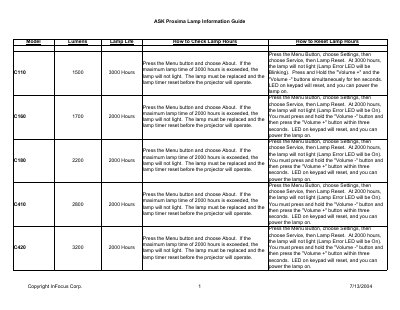
This document serves as an information guide for the InFocus ASK Proxima series of projector lamps. It lists specific model numbers alongside their corresponding lumens output and maximum rated life in hours.
The guide also provides detailed instructions on how to check current lamp usage hours and reset the lamp timer for different models when the maximum lifespan is reached or exceeded.
| Model DP1000x Lumens | 1100 |
|---|---|
| Model DP2900 Max Life | 400 Hours |
| Model DP5100 Lumens (Color) | 300 |
| Model DP6850 Max Life | 1500 Hours |
Press the Menu button, choose Settings, then choose About. If the maximum lamp time is exceeded, the Lamp Error LED will be On.
The maximum lamp time for the C110 model is 3000 hours.
The DP2900 model has a lamp life of 400 hours.
The maximum lamp time for the DP6500x model is 2000 hours.