
This document describes a solution for protecting networks using Microsoft Network Access Protection (NAP) and Allied Telesis Switches. By implementing a Network Access Control (NAC) solution, network administrators can efficiently manage network access and network security.
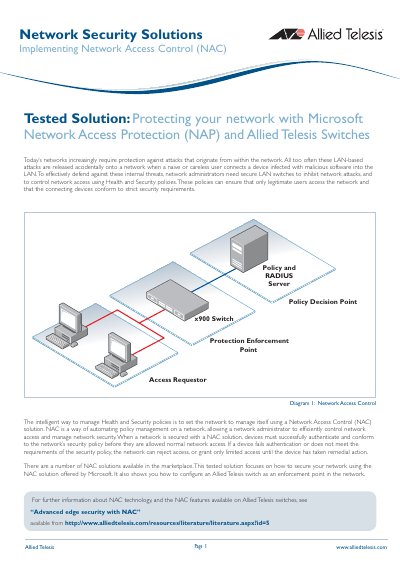
This tested solution demonstrates how to protect a network from internal threats by implementing Microsoft Network Access Protection (NAP) alongside Allied Telesis switches. The solution automates policy management to ensure that only legitimate users with compliant devices can access the network, while non-compliant devices are restricted to limited access until remedial action is taken.
The document details the configuration of an Allied Telesis switch running the AlliedWare Plus OS to act as a RADIUS Network Access Server (NAS), 802.1X authenticator, DHCP server, and Network Protection enforcement point. It provides specific configuration scripts for creating VLANs for compliant and non-compliant clients, setting up Access Control Lists (ACLs) to restrict traffic, and enabling 802.1X authentication on switch ports.
The server must run Windows Server 2008, and client PCs must run Windows Vista or Windows XP with Service Pack 3.
Noncompliant PCs are allocated an IP address in the range 192.168.2.167 – 192.168.2.200.
Ports 1.0.1 through 1.0.8 are set as non-authenticating ports to connect servers and routers.