
3M MP8625 Multimedia Projector Quick Setup Instructions

This is a quick setup instructions manual for a 3MP8625 multimedia projector. It introduces how to connect power, video, audio cables, and how to use the remote control, switch, etc.
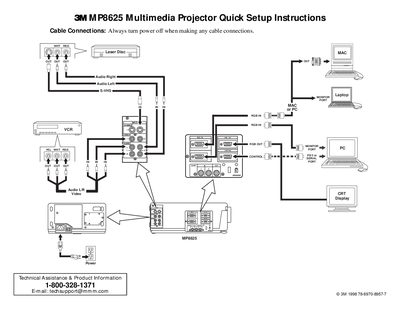

3M MP8625 Multimedia Projector Quick Setup Instructions - cover page
Brand
3M
Category
Projector
Document type
Quick Start Guide
Language
English
Pages
2
File format
PDF
File size
83 KB
Published
06 July, 2012
Updated
30 September, 2023
Model
MP8625
MD5 checksum
EFC70030ECC856B6BC09173FE4D1081C

About this manual

This document provides quick setup instructions for the 3M MP8625 Multimedia Projector. It details the necessary cable connections, including VGA, video, and audio cables, and emphasizes turning off power before connecting. The guide lists the items included in the project packout.

What's inside

  • Cable Connections
  • Project Packout
  • Start Up Procedure
  • Shutdown Procedure
  • Remote Control Transmitter
  • Projector Controls
  • Menu Navigation

Frequently asked questions

What safety precaution must be taken before connecting cables?

Always turn the power off when making any cable connections.

How long should you hold the STANDBY/ON button to shut down the projector?

Press and hold the STANDBY/ON button for 3-5 seconds.

How long does the fan motor run after shutting down?

The fan motor will run for about 1 minute to cool the projector.

Download PDF (83 KB)

More 3M Manuals


View all 3M manuals →