
Uniden D1680 Series Cordless Phone System User's Guide

This manual describes the features and usage of D1680 series phones.
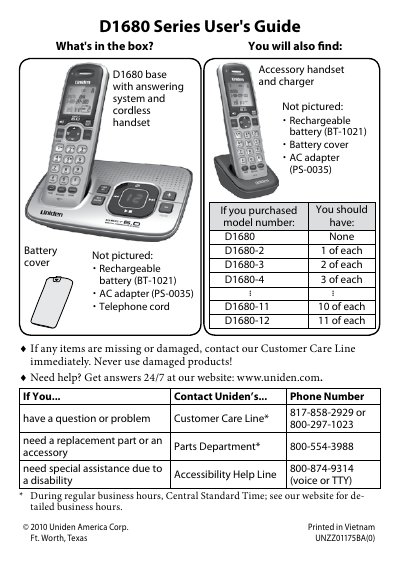

Uniden D1680 Series Cordless Phone System User's Guide - cover page
Brand
Uniden
Category
Telephone
Document type
User Manual
Language
English
Pages
22
File format
PDF
File size
1.2 MB
Published
05 July, 2012
Updated
30 September, 2023
MD5 checksum
5F8B5ABD60A1DAF40DED15D12DAEDCEC

About this manual

The Uniden D1680 Series User's Guide provides instructions on setting up the cordless telephone system, including charging batteries, connecting the base to a wall jack, and configuring dial modes. It details how to use handset keys such as Talk/Flash, Menu/Select, and Phonebook for navigation.

What's inside

  • What's in the box
  • Installing Your Phone
  • Getting to Know Your Phone
  • Using the Handset Menu
  • Using the Phonebook
  • Silent Mode
  • Chain Dialing
  • Voice Message Notification
  • Using the Answering System
  • Important Safety Instructions

Specifications

Battery TypeRechargeable battery (BT-1021)
AC Adapter ModelPS-0035
Charging Timeabout 15 hours

Frequently asked questions

What should I do if items are missing or damaged?

Contact the Customer Care Line immediately.

How long does it take to charge the handsets?

It takes about 15 hours to charge all handsets completely.

How do I change from tone dialing to pulse dialing?

Press MENU/SELECT, choose Global Setup, select Dial Mode then Pulse.

Download PDF (1.2 MB)

More Uniden Manuals


View all Uniden manuals →