
This document introduces the modified contents of the VX software, including allowing any channel to be set for non-dim operation, using a specific DMX switch setting to set the channel operation, and setting single channels and setting multiple channels at the same time.
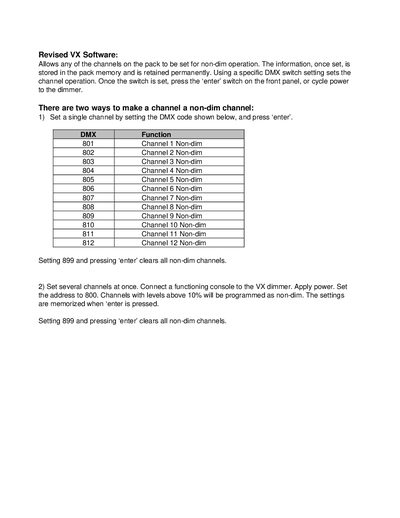
This document provides instructions for the revised VX Software, which allows any channel on the pack to be set for non-dim operation. Once configured, these settings are stored in the pack memory and retained permanently.
There are two methods described for setting channels: individually by using specific DMX function codes (801-812) or clearing all with code 899; or collectively by connecting a functioning console to the dimmer, setting the address to 800, and programming channels with levels above 10%.
Set the specific DMX function code for that channel (e.g., 801 for Channel 1) and press 'enter'.
Set the DMX function to 899 and press 'enter' on the front panel.