
700 series 200 amp clamp meter manual introduces the function characteristics of the clamp meter, including non-contact voltage (NCV), maximum voltage (Max), AC voltage (VAC), DC voltage (VDC), frequency (Frequency), resistance (Resistance), capacitance (Capacitance), diode (Diode), continuity (Continuity) and so on.
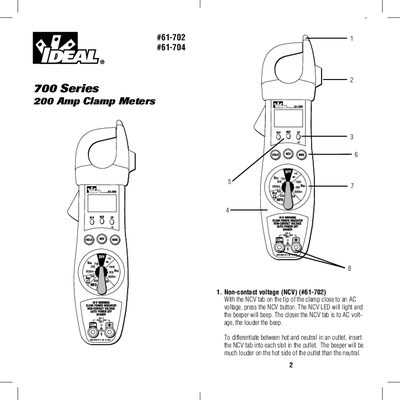
The document serves as a user guide for the IDEAL 61-702 and 61-704 series of 200 Amp clamp meters. It details the operation of various functions including non-contact voltage (NCV) detection, rotary switch settings, port connections, and specific measurement procedures for AC/DC volts, frequency, resistance, capacitance, diode checks, and continuity tests.
| AC Current Range | 200A |
|---|---|
| AC Voltage Range | 750V |
| DC Voltage Range | 1000V |
| Resistance Range | 200kΩ |
| Capacitance Range | 200MFD |
| Power Requirements | 9V NEDA 1604 Battery |
| Battery Life (Alkaline) | 150 hours typical |
Press the NCV button while the NCV tab on the tip of the clamp is close to an AC voltage; the LED will light and the beeper will sound.
The meter should not exceed 750VAC or 1000VDC under any circumstances.
Press the Max button again, or press the reset button to clear the max value.