
DS9097U is a universal 1-Wire® COM port adapter with a true-ground interface to an RS232 COM port for reading and writing 1-Wire devices. It works with bipolar as well as unipolar logic signals and is compatible with COM ports of (±)5V to (±)12V (DB-9 version only) or (±)6V to (±)12V (DB-25 version). It supports reading and writing at regular and Overdrive speeds and provides a strong pull-up to 5V for Temperature-, Crypto-, and EEPROM 1-Wire devices. It can program 1-Wire EPROM devices (DB-25 version with external 12V power supply only) and communicates at data rates of 9.6 (default), 19.2, 57.6, and 115.2 kbits/s. It has a standard DB-9 or DB-25 female connector and a 6-lead RJ-11 connector for easy attachment of standard 1-Wire cables and probes.
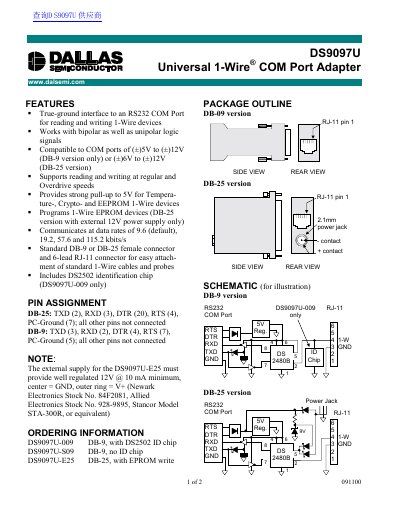
The DS9097U is a sophisticated RS232 to 1-Wire Adapter that performs level conversion and actively generates 1-Wire communication signals. It enables an IBM-compatible PC to directly communicate with any 1-Wire device connected to the adapter's RJ-11 port when used with adequate TMEX software driver.
The adapter communicates at data rates of 9.6, 19.2, 57.6, and 115.2 kbits/s.
For EPROM programming the external power supply must provide a regulated 12V.
The external supply must provide a minimum of 10 mA.