
Avid Fast Track Ultra Hookup Diagram User Guide

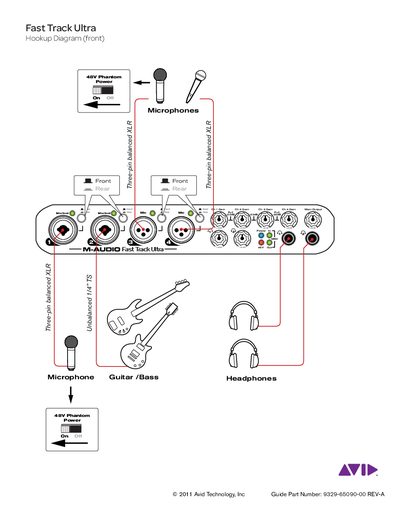
This document provides a connection diagram for the Avid Fast Track Ultra and describes how to use the interface.

Avid Fast Track Ultra Hookup Diagram User Guide - cover page
Brand
Fast
Category
Other Electronics
Document type
User Manual
Language
English
Pages
2
File format
PDF
File size
827 KB
Published
03 July, 2012
Updated
30 September, 2023
MD5 checksum
488C94B28FC15B2C381B93BF4ECED30C

About this manual

The guide displays a front hookup diagram illustrating connections for phantom power, balanced XLR microphones, unbalanced TS inputs for guitar or bass, and headphone outputs. It also indicates support for USB 2.0 connectivity.

The back of the diagram details additional connections including MIDI cables, special insert cables for compressors and EQs, and various audio inputs such as preamps, CD players, keyboards, mixing desks, amplifiers, and powered monitors using TRS or RCA connectors.

What's inside

  • Hookup Diagram (front)
  • Microphone Connections
  • Guitar/Bass Inputs
  • Headphone Output
  • USB 2.0 Connection
  • MIDI Controller Connections
  • Insert Cables
  • Audio Equipment Connections

Frequently asked questions

What type of cables are used for microphones?

The device uses three-pin balanced XLR connectors for microphones.

What power supply is required?

A 5VDC 2000mA power supply is required for the device.

Download PDF (827 KB)

More Fast Manuals


View all Fast manuals →