
HP 6890 Series FID EPC Flow Control Manifold Installation Guide

This document describes how to install the FID EPC flow control manifold for the HP 6890 Series GC

HP 6890 Series FID EPC Flow Control Manifold Installation Guide - cover page
Brand
HP
Document type
Service Manual
Language
English
Pages
8
File format
PDF
File size
2.1 MB
Published
08 June, 2012
Updated
30 September, 2023
MD5 checksum
FCF24727196EA7E1942518F5B0F10E01

About this manual

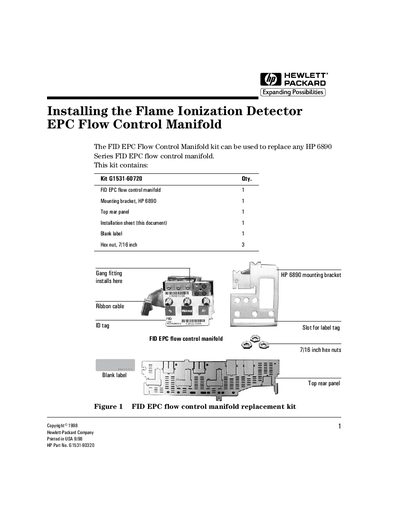
This document provides step-by-step instructions for installing the FID EPC Flow Control Manifold replacement kit on an HP 6890 Series Gas Chromatograph. The kit includes a new manifold, mounting bracket, top rear panel, and necessary hardware.

The guide covers safety precautions regarding hydrogen gas and electrical power, as well as detailed procedures for removing the existing manifold and installing the new assembly. It specifically addresses differences between manifolds installed before and after May 1998.

What's inside

  • Tools required
  • Safety information
  • Removing the existing manifold
  • Installing the new manifold
  • Routing the ribbon cable
  • Connecting gas lines
  • Top rear panel cutouts

Frequently asked questions

How many hex nuts are included in the replacement kit?

The kit contains three 7/16 inch hex nuts.

What specific screw is used to secure the manifold in place?

You must use a Torx T-20 screw to hold the detector manifolds.

Download PDF (2.1 MB)

More HP Manuals


View all HP manuals →