
This document is a quick setup guide produced by NEC Viewtechnology, Ltd. in 2005, which introduces the usage of VT580/VT480/VT58/VT48 projectors, including connecting the power cable, turning on the main power switch, selecting a source, and connecting a computer.
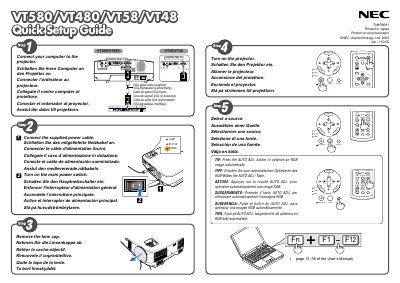
This guide provides the essential steps to set up NEC VT580/VT480/VT58/VT48 projectors. It covers connecting power, adjusting the tilt foot, and using the zoom and focus controls.
The manual also explains how to use the Auto Keystone Correction (Vertical) and manual keystone distortion correction features, helping you achieve a properly aligned image quickly. This manual is written in Japanese.
Adjust the tilt foot as described in the manual.
Use the Auto Keystone Correction (Vertical) feature or the manual keystone correction option.
Unplug the power cable from the outlet.