
This is a projector manual, which introduces the connection method, power supply, power on/off and other operations of the projector
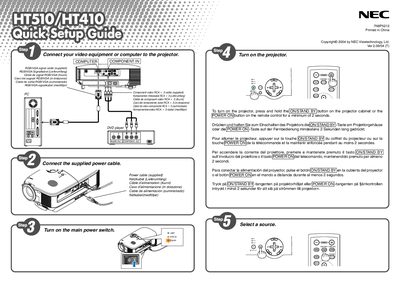
This guide provides the essential steps to set up and operate the NEC HT510 projector. It includes multilingual instructions (English, German, French, Italian, Spanish, Swedish, etc.) for turning the device on and connecting cables.
Key actions include pressing and holding the ON/STANDBY button on the projector or the POWER ON button on the remote for at least two seconds, as well as connecting the appropriate VGA/HDMI cables. The guide is intended for first‑time users to get the projector running quickly.