
This is a quick start guide for JVC DR-MV77SU/78BU DVD recorder, which introduces the basic connection and operation methods of the product.
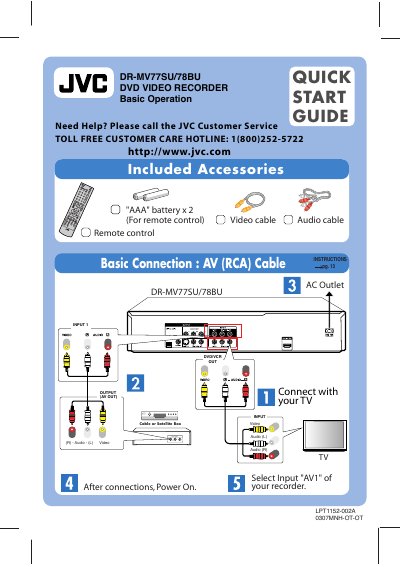
This guide provides the essential steps to get the JVC DR-MV77SU/78BU DVD video recorder up and running. It lists the included accessories, shows how to connect the unit to a TV using AV (RCA) cables, and explains the initial power‑on and remote‑control setup.
The document also describes basic playback and recording functions, timer‑recording setup (including Timer‑Link mode with a cable/satellite box), and how to dub VHS tapes to DVD. Important notes such as finalising recorded discs for playback on other DVD players are included.
| Supported Disc Formats | DVD‑Video, DVD‑R, DVD+R, DVD‑RW, DVD+RW, CD‑R, Video CD, Audio CD |
|---|---|
| Remote Control Power | 2 AAA batteries |
| Video/Audio Connection | AV (RCA) cable |
Insert a blank DVD, access the Dubbing menu, press the DUBBING button, and follow the prompts to transfer the VHS content to the disc.
Finalize the disc after recording; this step is required for playback on other DVD players.