
This document is the basic operation manual for JVC DR-MV150B DVD video recorder, which introduces the connection methods of antenna, cable TV, cable box, TV, etc.
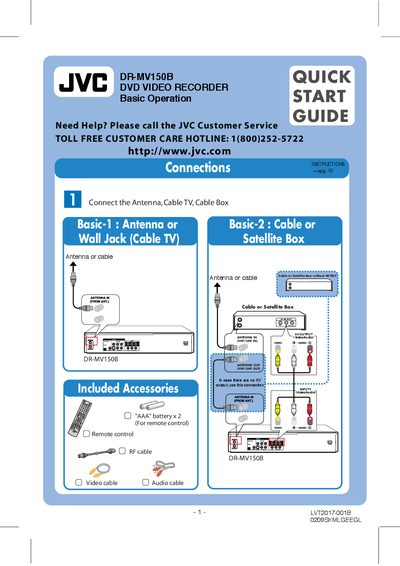
The guide explains how to connect the antenna, cable TV or satellite box to the DR-MV150B, set up the TV connection, and power on the unit. It also covers the initial setup wizard for language, tuning band, date, and remote control configuration.\n\nLater sections describe basic playback of various disc formats, one‑touch recording options, timer recording setup, and how to dub VHS tapes to DVD, including required resolution settings and button sequences.
| Supported disc formats | DVD‑Video, DVD‑R, DVD+R, DVD‑RW, DVD+RW, DVD‑RAM, CD‑R, CD‑RW, Video CD, Audio CD |
|---|---|
| DVD recording modes | XP, SP, LP, EP |
| VCR recording modes | SP, SLP |
| Remote control batteries | 2 × AAA |
| Dubbing output resolution | 480i |
Connect the antenna or wall jack to the ANTENNA IN (Video/Audio) input and the cable TV or satellite box to the appropriate input as shown on page 1.
The unit can play DVD‑Video, DVD‑R, DVD+R, DVD‑RW, DVD+RW, DVD‑RAM, CD‑R, CD‑RW, Video CD and Audio CD discs.