
This document describes how to configure a secure IPSec VPN tunnel between a NETGEAR DG834/DG834G and a NETGEAR FVL328.
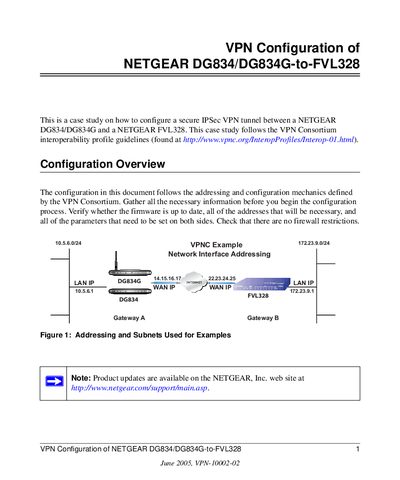
This case study explains how to set up a secure IPSec VPN tunnel between a Netgear DG834/DG834G and a Netgear FVL328 gateway. It follows the VPN Consortium interoperability profile and includes all required addressing, firmware, and security parameters.
The document walks through using the built‑in VPN Wizard, editing policy settings, and testing the tunnel with ping and status tools. Screenshots illustrate each step, and a flowchart shows the recommended testing sequence.
| DG834/DG834G firmware version | V2.10.17 |
|---|---|
| FVL328 firmware version | V2.0_07 |
| IKE Phase 1 encryption | TripleDES |
| IKE Phase 1 SA lifetime | 28800 seconds |
| IKE Phase 2 SA lifetime | 3600 seconds |
| Pre‑shared key (example) | hr5xb8416aa9r6 |
The default address is http://192.168.0.7 with the default username "admin" and password "password".
TripleDES for encryption and SHA‑1 for hashing are used in IKE Phase 1.