
This manual describes how to use your Dell Dimension 3100/E310 computer.
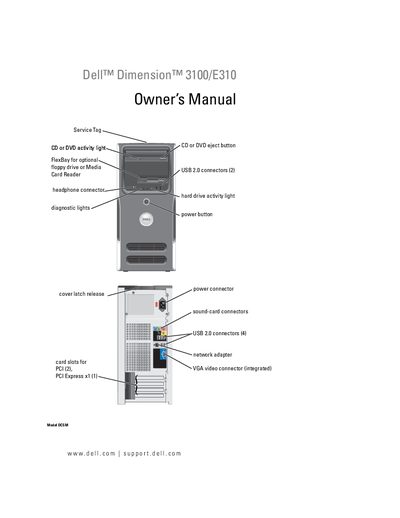
This manual guides users through setting up and using the Dell Dimension 3100/E310 desktop, including connecting peripherals such as USB printers, media card readers, and configuring network adapters. It also covers operating system installation, power management features, and RAID configuration options.
Additional sections detail hardware maintenance procedures like removing and installing drives, memory modules, and the battery, as well as troubleshooting common problems with audio, video, networking, and software. A specifications appendix lists the system’s technical parameters.
See the "Connecting a USB Printer" section of the manual for step‑by‑step instructions.
Follow the instructions in the "Replacing the Battery" section to safely remove and install a new battery.