
This document introduces the location of external interfaces, power switches, indicator lights, power cord, external card slots, etc. of Dell Dimension™ 8400 Series computers.
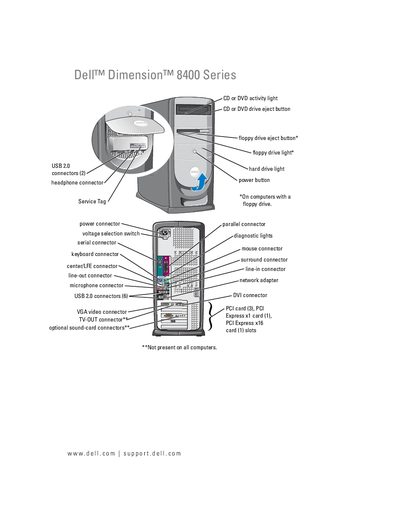
This manual covers the initial setup of the Dell Dimension 8400 Series, describing the front‑panel connectors, internal components, and installation of drives, memory, and expansion cards. It also explains how to configure RAID, connect peripherals such as printers, monitors, and network adapters, and use the operating system utilities.
Later sections detail power‑management options (Standby and Hibernate), diagnostic lights, troubleshooting common hardware and software problems, and procedures for removing and reinstalling parts. The appendix lists specifications and system‑setup options.
| USB 2.0 connectors | 6 |
|---|---|
| PCI slots | 3 |
| PCI Express x1 slots | 1 |
| PCI Express x16 slots | 1 |
| DVI connector | Present |
| Power‑management modes | Standby, Hibernate |
The computer provides six USB 2.0 connectors.
It supports Standby Mode and Hibernate Mode.