
This is a user manual for Dell USB Enhanced Multimedia Keyboard. It introduces the use of keyboard LED indicators, hotkeys, Audio Cluster, Application Key and Windows Keys.
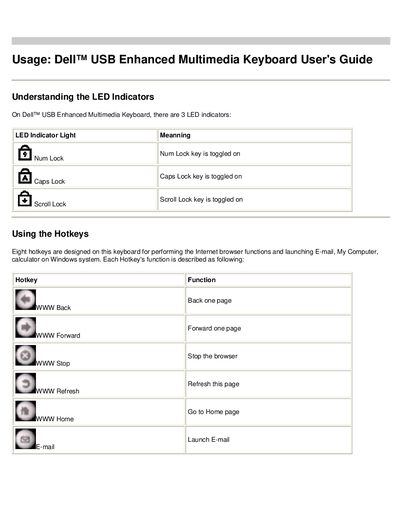
This guide introduces the Dell USB Enhanced Multimedia Keyboard and describes its LED indicators, hotkeys for web navigation, the audio cluster for volume control, and special Application and Windows keys for quick access to common Windows functions. Detailed tables list each hotkey and its function, as well as the audio cluster’s volume knob and mute features.
The keyboard includes two USB Full‑speed hub ports for connecting additional devices and outlines the system requirements needed for proper operation, such as a free USB port and compatible Windows or Linux operating systems.
| LED indicators | Num Lock, Caps Lock, Scroll Lock |
|---|---|
| USB ports | 2 USB Full‑speed hub ports |
| System requirement – USB | One free USB port |
| Supported OS | Windows 2000, Windows XP, Red Hat Linux Enterprise WS |
The three LED indicators show the status of Num Lock, Caps Lock, and Scroll Lock keys.
Press the hotkey for Back one page (WWW Back), Forward one page (WWW Forward), Stop (WWW Stop), Refresh (WWW Refresh), or Home (WWW Home).
Turn the volume knob clockwise to increase volume and counter‑clockwise to decrease it; press the mute key to toggle mute.
The keyboard supports shortcuts such as Windows key + E, Windows key + F, Windows key + M, Windows key + R, Windows key + F1, Windows key + TAB, and Windows key + Ctrl + F.