
WinTotal software is a powerful package that makes wire marker printing simple in an industrial environment. Running in the familiar Windows™ environment, the package is pre-loaded with all the Raychem Interconnect wire identification products to facilitate marker design. The software features a highly graphical user interface to simplify operator training and minimize errors. The Windows™ environment gives access to a huge array of font options, including non-English fonts such as Chinese, Japanese and Hebrew (when used with appropriate operating systems or add-on software), and also allows simple importing and manipulation of graphics and logos. Barcode printing is available. WinTotal software supports all common wire identification needs, including manual printing, automatic set printing from spreadsheets, databases or other CAD systems (including Raychem Interconnect’s HarnWare™ harness design software package), incremental alpha and numeric fields, double-sided marker printing, automatic or manual routing to multiple printers, paper output option, wraparound marker production, user-defined products, and programmable buttons for repeated data insertion.
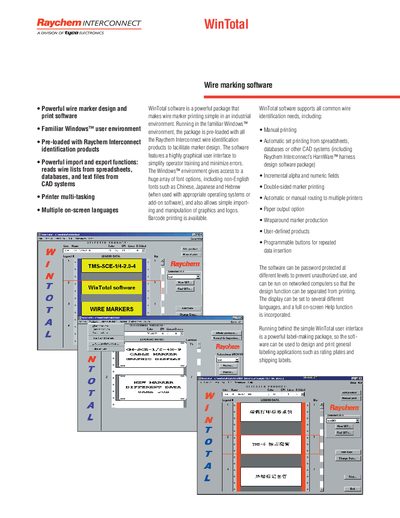
The WinTotal software is a Windows‑based package for designing and printing wire markers, pre‑loaded with Raychem Interconnect identification products. It offers a graphical interface, multi‑language support, barcode printing, and can be used for general labeling such as rating plates and shipping labels.
The manual includes recommended computer specifications, supported barcode types and image formats, ordering details, and information on password protection, network operation, and multi‑printer routing.
| Processor | 100 MHz, 486 or better |
|---|---|
| RAM | 16 MB or more |
| Operating System | Windows 3.x, 95, 98 or NT |
| Disk Space Required | 3 MB |
| Supported Barcode Types | Codabar, Code 39, Code 93, EAN‑13, EAN‑8, UPC‑A, UPC‑E, Interleaved 2/5, ITF (DUN14) |
| Supported Image Formats | BMP, PCX, MSP, WMF, JPG, JIF, GIF |
| Part Number | TMS-WINTOTAL-SWARE |
| Disk Format | 3½" floppy disks (software can also be emailed) |
A PC with at least a 100 MHz 486‑class processor, 16 MB RAM, Windows 3.x/95/98/NT, and 3 MB of free disk space.
WinTotal supports Codabar, Code 39, Code 93, EAN‑13, EAN‑8, UPC‑A, UPC‑E, Interleaved 2/5, and ITF (DUN14).
Yes, WinTotal can be password protected at different levels to prevent unauthorized use.
BMP, PCX, MSP, WMF, JPG, JIF, and GIF files can be imported.