
This file is the user manual for AP4111 phone, which explains how to use AP4111 phone in 70cm amateur radio communication. The phone needs to be modified to work properly, and the specific modification methods can be found in the AP4111 folder on the moppeakatemia website.
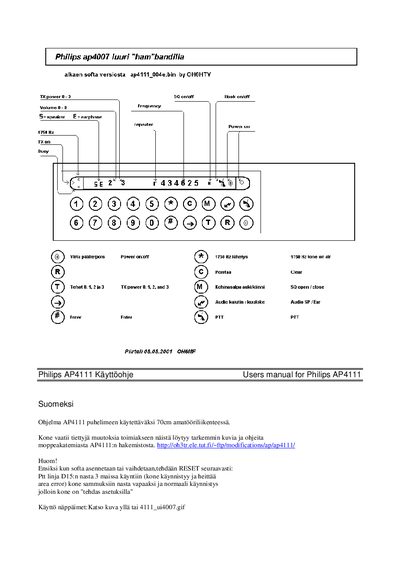
This manual provides instructions for the Philips AP4007 (also referenced as AP4111) handheld amateur‑band radio. It includes details on the firmware version, required modifications for HAM‑band use, and how to reset the device to factory defaults after a firmware change.
The document describes each button and indicator on the handset, explains power, volume, squelch, and frequency settings, and lists the LED meanings. It also gives the frequency prefix rules and notes on using the PTT line via the D15 pin.
| TX power levels | 0‑3 |
|---|---|
| Audio volume range | 0‑8 |
| Squelch sensitivity levels | 0‑3 stars |
| Frequency prefix | 43 (top two digits) |
| Display backlight | On (button 2) |
Ground the PTT line on D15 pin 3, turn the power on so the phone shows “area error”, then switch the power off, release the pin, and power on again. The handset will start with factory defaults.
The * (left yellow LED) signals a 1750 Hz beep tone.