
This document describes the usage and features of the 4312/4313 model watch. The watch has demonstration mode, timing function, world time function, timer function, pointer setting function, and alarm function. In addition, it also explains how to exit the demonstration mode, how to enter the demonstration mode, how to select the display screen, and how to set the duration of the backlight.
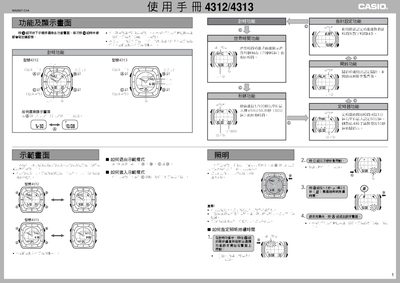
This manual covers all functions of the Casio 4312/4313 radio‑controlled watch, including how to exit and enter demo mode, select display screens, and use the timer, stopwatch, and alarm features. It also describes the world‑time function that can show the current time in 48 cities across 29 time zones.
Detailed instructions are provided for receiving calibration signals from Japanese (JJY) and US (WWVB) transmitters, both automatically at preset times and manually via button presses. The guide explains how to configure the residence city, daylight‑saving settings, illumination duration, and how to manually adjust the pointer hands when they become out of sync. This manual is written in Chinese.
| Stopwatch resolution | 1/100 second, up to 59 min 59.99 s |
|---|---|
| World‑time cities | 48 cities (29 time zones) |
| Illumination duration | 1.5 s or 2.5 s |
| Calendar range | Up to year 2099 |
Press any of the A, B, C, or D buttons to leave demo mode.
In the timing function, hold the D button about two seconds; the watch will beep and start receiving the signal.
Enter the world‑time function, select the city with D, then hold A about two seconds to toggle the DST indicator on or off.
The backlight can be set to stay on for either 1.5 seconds or 2.5 seconds.