
This is a document about BIOS Power Management Setup.
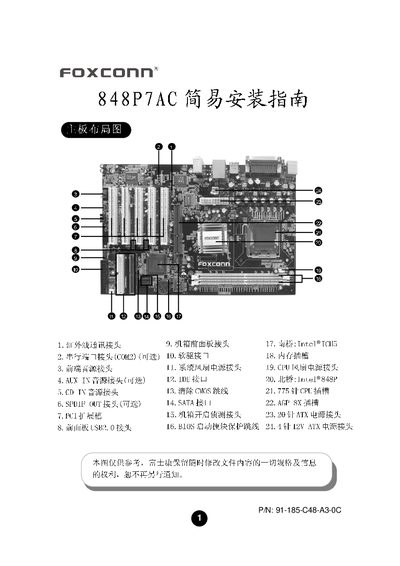
The guide explains how to connect all front‑panel and rear‑panel connectors on the 848P7AC motherboard, including power, audio, USB, SATA, IR, and various jumper settings such as CMOS clear and BIOS protection. Detailed pin‑out diagrams and jumper instructions help ensure correct wiring before powering the system.
It also covers BIOS setup, driver installation for the integrated ALC655 audio chip, and optional features like intruder detection and 6‑channel audio configuration. Follow the illustrated steps to complete a successful first‑time installation. This manual is written in Chinese.
| CPU Socket | Socket 775 |
|---|---|
| Supported CPUs | Intel Pentium 4 (Prescott), Celeron D |
| Front‑Side Bus | 533 MHz / 800 MHz |
| Memory Slots | 2 × 184‑pin DDR |
| Maximum Memory | 26 GB |
| Supported DDR Speed | DDR 266/333/400 |
| Integrated Audio Chip | ALC655 |
| SATA Ports | 2 × Serial ATA |
| USB 2.0 Ports | 2 × USB 2.0 (F_USB1, F_USB2) |
Connect devices to the F_USB1 or F_USB2 connectors and install the appropriate drivers for USB devices.