
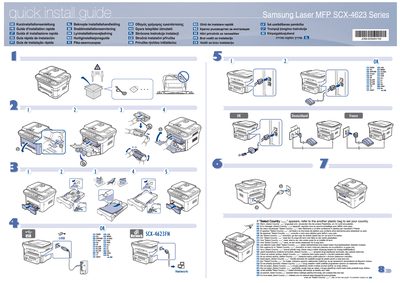
The guide offers fast, step‑by‑step instructions for installing the Samsung SCX‑4623 laser MFP. It includes multilingual headings such as "Kurzinstallationsanleitung" and "Guida d'installazione rapida" to help users worldwide set up the device quickly.
Safety information is highlighted, directing users to read the safety guidelines in the User's Guide on the supplied CD‑ROM before operation. The guide also points to the network‑setup section for configuring the printer on a network.
If the "Select Country" message appears, use the additional plastic bag provided to set your country.
Read the safety guidelines in the Users Guide on the supplied CD‑ROM before using the product.
Consult the network setup section in the User's Guide for instructions on connecting the printer to a network.