
This document is a user guide for DVDR3345 1 DVD recorder. It provides information about the packaging list, connection methods, and instructions for operation and settings.
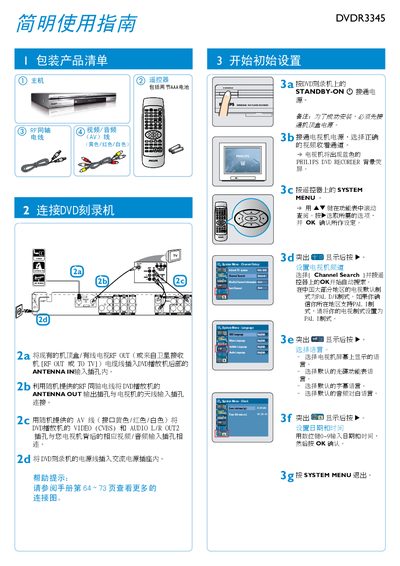
This guide explains how to connect the DVDR3345 to your TV and other equipment, including antenna, RF, and AV cables, and how to perform the initial setup such as channel search, language selection, and date/time configuration.\n\nIt also covers manual recording of TV programs or external sources, playback of recorded discs, supported disc formats and recording modes, and provides troubleshooting advice for common issues. This manual is written in Chinese.
| Supported disc formats | DVD±R/±RW |
|---|---|
| Recording modes | 1‑hour, 2‑hour, 4‑hour, 6‑hour |
| Video inputs | Front CVBS, Front S‑Video, Rear CVBS, Rear S‑Video, DV, YUV |
Press SYSTEM MENU, go to the Language Menu, and select the desired language for the menu, subtitles, and audio.
Enter SYSTEM MENU, select the Clock/Time menu, input the date and time using the numeric keys, and confirm with OK.