
This manual provides detailed instructions on how to use DVDR 520H, including connection, installation, settings, playback and recording
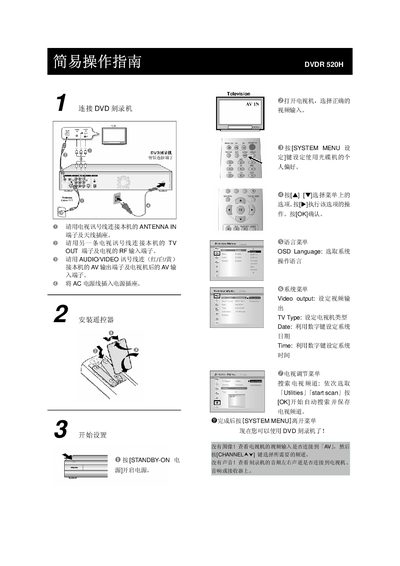
This guide explains how to connect the DVDR 520H to a television using the antenna and TV signal cables, install the remote control, and configure system settings such as language, date and time. It also covers searching for TV channels and adjusting video output.
The manual details how to play media files from supported discs (DVD‑R/RW, DVD+R/RW, CD‑R/RW, DVD‑Video, JPEG, MP3) and how to record video onto DVD+R/RW discs, including selecting input sources, recording modes, and finalising discs with the disc‑tool function. This manual is written in Chinese.
| Supported playback formats | DVD‑R/RW, DVD+R/RW, CD‑R/RW, DVD‑Video, JPEG, MP3 |
|---|---|
| Recording mode durations | M1 16 h, M2 32 h, M2x 43 h, M3 48 h, M4 64 h, M6 96 h |
Connect a TV signal cable from the unit’s ANTENNA IN terminal to the antenna socket, and another TV signal cable from the TV OUT terminal to the TV’s RF input; also use an AV cable for audio/video connections.
The device can play DVD‑R/RW, DVD+R/RW, CD‑R/RW, DVD‑Video, JPEG images and MP3 audio files.
Press the GUIDE key, select "Record", choose the input source and channel, set the desired recording mode, then confirm with OK.