
This manual introduces the basic operating methods of the Canon PowerShot A1200 IS digital camera, including using batteries, installing storage cards, turning the camera on and off, setting the date and time, taking pictures, using the flash, zooming, setting image size and quality, self-timer, etc.
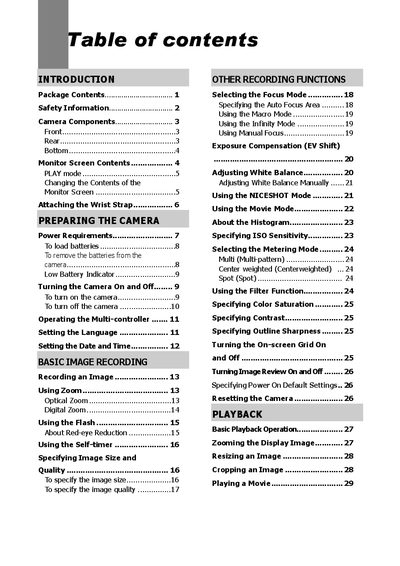
This manual covers everything needed to get started with the C200 digital camera, including package contents, safety precautions, power requirements, and how to prepare the camera for use. It explains basic image recording, playback functions, file management, and settings such as white balance, ISO sensitivity, and focus modes.
Later sections describe how to use memory cards, connect the camera to a computer, install software, and perform maintenance. A troubleshooting guide and full specifications are provided at the end of the document.
| Resolution | 6 Mega Pixels CCD |
|---|---|
| Sensor Size | 1/1.8 inch |
| Lens | 3x optical zoom, f/2.8‑4.9 (8‑24 mm) |
| LCD Display | 1.6" TFT color LCD |
| ISO Sensitivity | Auto, 64, 125, 250, 500 |
| Image Resolutions | 2816 × 2112, 2816 × 1872, 2048 × 1536, 1600 × 1200, 1280 × 960, 640 × 480 |
| Video Resolution | 320 × 240, AVI (Motion JPEG) |
| Operating Temperature | -10 °C to 40 °C (14 °F to 104 °F) |
The maximum still image resolution is 2816 × 2112 pixels.
Yes, it records video at 320 × 240 resolution in AVI (Motion JPEG) format.
It supports SD cards and MultiMediaCards.