
MAX756/MAX757 3.3V/5V/Adjustable-Output, Step-Up DC-DC Converters
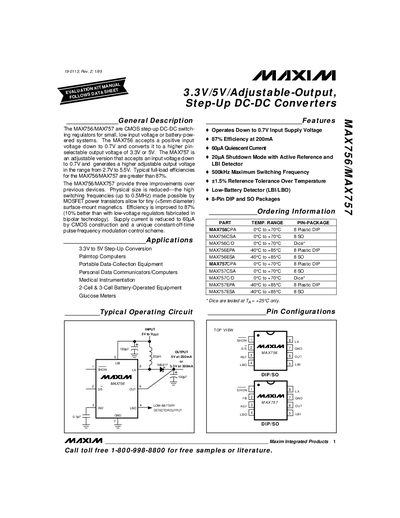
The MAX756 and MAX757 are CMOS step‑up DC‑DC switching regulators designed for low‑voltage or battery‑powered systems. The MAX756 provides fixed 3.3 V or 5 V outputs, while the MAX757 offers an adjustable output from 2.7 V to 5.5 V. Both devices operate from input voltages as low as 0.7 V and achieve efficiencies greater than 87 % at 200 mA.
The datasheet includes absolute maximum ratings, electrical characteristics, typical operating curves, pin descriptions, layout guidelines, and recommended component selections. Ordering information for various DIP and SO packages is also provided.
| Input voltage range | 0.7 V – 5 V |
|---|---|
| Fixed output voltages (MAX756) | 3.3 V or 5 V |
| Adjustable output range (MAX757) | 2.7 V – 5.5 V |
| Typical efficiency at 200 mA | 87 % |
| Maximum switching frequency | 500 kHz |
| Quiescent current | 60 µA |
| Shutdown mode current | 20 µA |
| Package types | 8‑pin DIP, 8‑pin SO, 5‑pin SO |
The MAX756 can start with an input voltage as low as 0.7 V.
Typical efficiency is greater than 87 % at a 200 mA load.
The SHDN pin disables the SMPS but leaves the voltage reference and low‑battery comparator active.