
This is a DVD home theater produced by Philips. It has multiple surround sound and excellent picture quality. It supports 1080p high-definition video playback. It uses the HDMI CEC (Consumer Electronics Control) industry standard protocol to connect to the TV via HDMI cable to control the TV's power and volume.
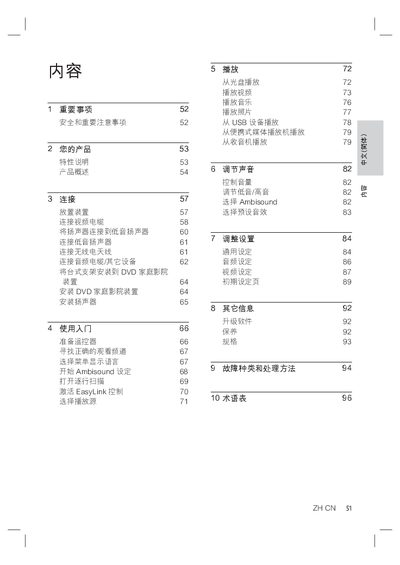
This manual guides users through the essential safety precautions, product features, and step‑by‑step installation of the Philips DVD Home Theater system. It covers connecting video and audio cables, mounting the unit, and configuring HDMI, component, or composite inputs.
Operating instructions include using the remote control, selecting sources, adjusting sound with Ambisound, enabling audio sync, and accessing menus for picture and audio settings. The guide also lists specifications, provides troubleshooting tips for common issues such as no picture or no sound, and includes a glossary of terms. This manual is written in Chinese.
| Total output power (home theater mode) | 600W |
|---|---|
| Frequency response (audio) | 20 Hz ~ 20 kHz |
| Signal‑to‑noise ratio (audio) | > 65 dB (CCIR) |
| Audio DAC resolution | 24‑bit / 192 kHz |
| Video DAC resolution | 12‑bit, 148 MHz |
| Power consumption (play mode) | 150 W |
| Standby power consumption | < 3 W (normal), < 0.3 W (low‑power) |
| Bass speaker driver size | 165 mm |
Connect the HDMI cable supplied with the unit from the HDMI OUT jack on the DVD Home Theater to the HDMI IN jack on the TV, then select the TV’s HDMI input.
Check that the HDMI cable is properly connected and not faulty; try a different HDMI cable or input, and ensure the TV is set to the correct video input channel.
Press and hold the Audio Sync button on the remote, then use the VOL + / ‑ buttons to set the desired audio delay time.
Take the device to an authorized recycling center; follow local regulations for disposing of packaging, batteries, and electronic waste.