
This document is the user manual for Philips mobile phone, which mainly introduces the basic operation, function selection shortcuts, main menu and other content.
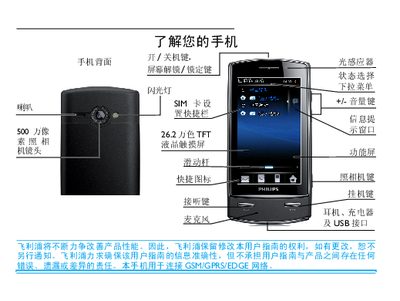
This manual explains the basic operation of the Philips mobile phone, including how to power the device on and off, enter PIN codes, make and receive calls, and use the touchscreen and physical keys. It also covers navigation of the main menu, accessing shortcuts, and using the built‑in camera and video functions.
Further sections describe how to customize settings such as screen brightness, power‑saving modes, lock screen behavior, and SIM card management. The guide details text input methods (full keyboard, handwriting, alphanumeric), contact management, messaging, and additional tools like the business assistant and broadcast features. This manual is written in Chinese.
| Display | 262,000‑color TFT LCD touchscreen |
|---|---|
| Sensors | Light sensor, dynamic sensor, proximity sensor |
Press and hold the power key at the top of the phone.
When the phone rings, press the answer button.
Short‑press the top key or drag the central dot to lock or unlock the screen.