
PT-UX20/UX10 is a business portable liquid crystal projector launched by Panasonic. It has a lamp replacement period of 5000 hours, a compact body and is easy to carry. It also supports quick start-up and immediate shutdown.
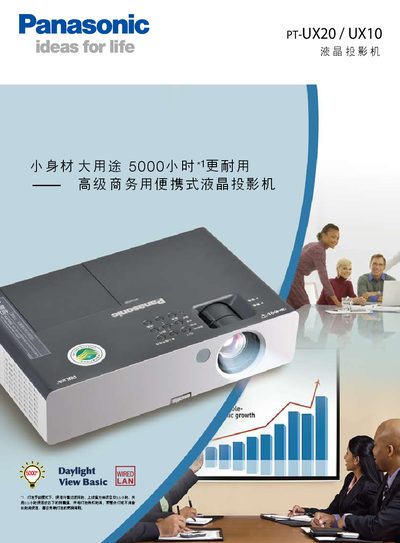
The PT‑UX20 and PT‑UX10 are compact, portable LCD projectors designed for business use. They feature a quick‑start function that projects the image immediately after pressing the power button, a 5000‑hour lamp life, real‑time keystone correction, and multiple projection modes including whiteboard and blackboard modes. The units support wired LAN for easy management, remote monitoring via PJLink, and can be ceiling‑mounted while still allowing maintenance without removal.
Connectivity includes dual RGB inputs, HDMI‑compatible D‑sub ports, S‑Video, RCA video, audio inputs/outputs, RS‑232C serial control, and a network RJ‑45 port. Detailed specifications list a 100‑240 V AC power supply, approx. 300 W consumption, 1024 × 768 native resolution, 2600 lm brightness, 500:1 contrast, and dimensions of 307 × 69 × 210 mm weighing about 23 kg. The manual also describes lamp and filter replacement procedures and provides a list of optional accessories. This manual is written in Chinese.
| Model | PT-UX20 / PT-UX10 |
|---|---|
| Power Supply | 100‑240 V AC, 50 Hz/60 Hz |
| Power Consumption | ≈300 W (standby 0.4 W) |
| Resolution | 1024 × 768 (786,432 pixels) |
| Brightness | 2600 lm |
| Contrast Ratio | 500:1 |
| Lamp Life | ≈5000 hours |
| Weight | ≈23 kg |
| Dimensions (W × H × D) | 307 × 69 × 210 mm |
| Ports | Dual RGB D‑sub, VGA, S‑Video, RCA video, 2× audio in, 1× audio out, RS‑232C, RJ‑45 (PJLink) |
The lamp is rated for about 5000 hours of operation.
Press the power button and the image is projected instantly.
It uses real‑time keystone correction that automatically senses the tilt angle and adjusts the image.
Yes, it can be connected via wired LAN and controlled or monitored remotely using PJLink and management software.