
This document describes the installation steps and precautions for Noctua's NH-D14 SE2011 CPU cooler, as well as the provided accessories and services. It emphasizes the product's compatibility and long-term investment value.
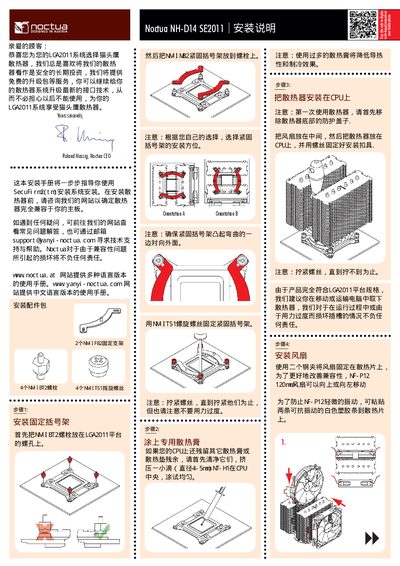
This guide walks you through installing the Noctua NH-D14 SE2011 cooler on an LGA2011 platform, including mounting the brackets, applying thermal paste, and securing the fan. It also points to the Noctua website for compatibility checks and additional resources.
The manual details warranty coverage of up to 72 months, how to obtain support, and instructions for connecting the fan using the supplied y‑split cable. It includes a brief FAQ and contact information for technical assistance. This manual is written in Chinese.
| Supported socket | LGA2011 |
|---|---|
| Included fan size | 120 mm (IF‑P12) and 140 mm (IF‑P14) |
| Warranty period | 72 months |
Use the supplied y‑split cable to connect the fan power connector to the CPU_FAN header on the motherboard.
The product is covered by a 72‑month warranty.
The Chinese language manual is available on the Noctua website (www.noctua.at).