
Key facts
- Manuals
- 13
- Models
- 1
- Languages
- ZH · EN
- Last added
- 2026-10-03
Noctua models by category
Featured Noctua manuals
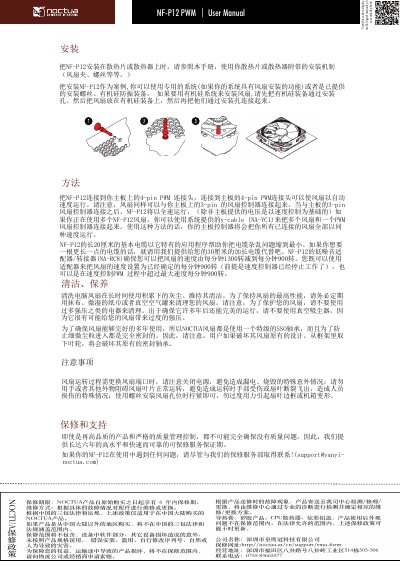
NOCTUA NF-P12 PWM Fan User Manual
This manual explains how to install the NF‑P12 PWM fan, connect it to a motherboard using the supplied y‑cable (NA‑YC1), and adjust fan speed via the PWM signal. It also describes the optional controller (NA‑RC8) and the fan's 4‑pin PWM and 3‑pin connector options.
Safety precautions are highlighted, such as turning off power before replacing the fan, avoiding contact with the blades, and tightening mounting screws only enough to secure the fan without deforming the chassis. This manual is written in Chinese.
Covers: Installation · Connector Types · Y‑Cable Connection · Controller (NA‑RC8) · Safety Precautions · Maintenance
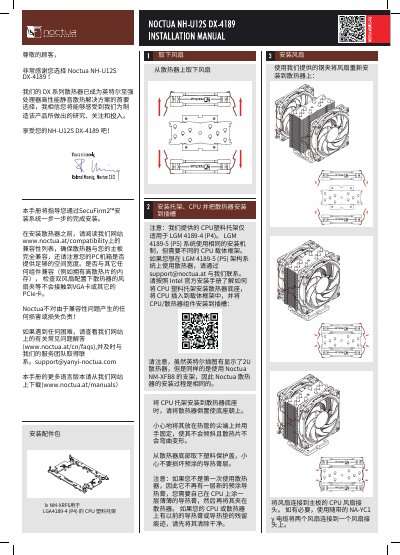
Noctua NH-U12S DX-4189 Heatsink Installation Guide
This manual walks you through installing the Noctua NH-U12S DX-4189 heatsink. It starts with a compatibility check, directing you to the Noctua website for supported motherboards and ensuring enough case clearance. The guide then details the required CPU plastic bracket for LGA4189‑4, fan mounting, and final placement of the cooler on the CPU.
Additional sections cover transport, handling, and warranty. Noctua provides a six‑year warranty and offers support via email. Safety notes include avoiding water on the cooler, handling the heat pipes carefully, and proper fan‑connector installation. This manual is written in Chinese.
Covers: Compatibility Check · CPU Plastic Bracket Installation · Fan Mounting · Heatsink Placement · Transport and Handling · Warranty and Support
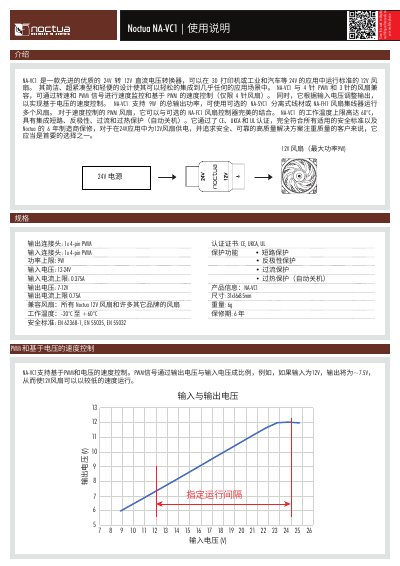
Noctua NA-VC1 DC Voltage Converter User Manual
The NA-VC1 is a compact 24 V‑to‑12 V DC voltage converter designed for 3D printers, industrial and automotive applications. It supports both 4‑pin PWM and 3‑pin fans, allowing speed monitoring and PWM‑based control (for 4‑pin fans) as well as voltage‑based speed control.
The unit provides up to 9 W total output power, includes short‑circuit, reverse‑polarity, over‑current and over‑temperature protection, and complies with CE, UKCA and UL certifications. Optional accessories such as the NA‑SYC1 cable, NA‑FH1 fan hub, and NA‑FC1 controller expand its functionality. This manual is written in Chinese.
Covers: Specifications · Protection Features · Product Information · Application Examples · Safety and Reset Procedure · Certification
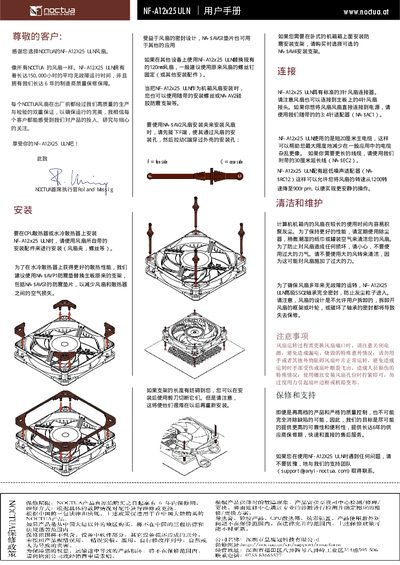
Noctua NF-A12x25 ULN Fan User Manual
This manual explains how to install the NF-A12x25 ULN 120 mm fan, including mounting instructions, compatible accessories, and wiring details. It also covers safety precautions such as powering off the system before replacement and avoiding contact with the rotating blades.
Additional sections describe the fan’s technical specifications, warranty and support options, and contact information for further assistance. The document is intended for end‑users and system builders who need reliable cooling performance. This manual is written in Chinese.
Covers: Precautions · Warranty and Support · Installation Guidelines · Compatibility · Fan Specifications · Support Contact
Latest Noctua manuals
NOCTUA NF-P12 PWM Fan User Manual
User Manual 1 pages · 660 KB · ZHThe NOCTUA NF-P12 PWM fan user manual provides installation, operation, and safety instructions for the 4‑pin PWM fan.
Noctua NH-U12S DX-4189 Heatsink Installation Guide
Installation Guide 2 pages · 4.4 MB · ZHInstallation guide for the Noctua NH-U12S DX-4189 CPU cooler, covering compatibility, mounting steps, and warranty information.
Noctua NA-VC1 DC Voltage Converter User Manual
User Manual 3 pages · 1.1 MB · ZHThe Noctua NA-VC1 converts 24 V to 12 V for fans, offering PWM and voltage‑based speed control with built‑in protection.
Noctua NF-A12x25 ULN Fan User Manual
User Manual 1 pages · 966 KB · ZHThe Noctua NF-A12x25 ULN fan user manual provides installation, operation, maintenance, and warranty information.
Noctua NF-A9 PWM Fan User Manual
User Manual 1 pages · 972 KB · ZHChinese user manual for the Noctua NF-A9 PWM fan covering installation, operation, maintenance and safety.
NOCTUA NF-A12x25 FLX Fan User Manual
User Manual 1 pages · 1 MB · ZHThe NOCTUA NF-A12x25 FLX fan user manual provides installation, wiring, speed control, maintenance, and warranty information.
Noctua NF-A4x20 FLX OmniJoin Adaptor User Manual
User Manual 2 pages · 602 KB · ZHThe Noctua NF-A4x20 FLX OmniJoin adaptor user manual provides wiring instructions, installation steps, compatibility details, and warranty information.
Noctua NH-D15 Product Specification Sheet
Product Leaflet 1 pages · 934 KB · ZHThe Noctua NH-D15 product specification sheet details dimensions, fan configuration, compatibility, and warranty information for this dual‑tower CPU cooler.
Noctua NF-A12x25 ULN Premium Fan Product Leaflet
Product Leaflet 1 pages · 212 KB · ENThe Noctua NF-A12x25 ULN premium fan provides ultra‑low noise operation with two speed settings and high efficiency for cooling applications.
Noctua NH-D14 SE2011 Installation Manual
Installation Guide 2 pages · 948 KB · ZHInstallation manual for the Noctua NH-D14 SE2011 CPU cooler, providing step‑by‑step instructions and warranty information.
Noctua NH-L12P-LGA775 Mounting Kit Installation Guide
Installation Guide 4 pages · 1.5 MB · ZHStep‑by‑step instructions for installing the Noctua NH‑L12P‑LGA775 mounting kit on compatible motherboards.
noctua NH-U12DX installation manual
NOCTUA NH-U12P SE1366 installation manual
Which document do I need?
User Manual
Day-to-day operation, settings and troubleshooting. Start here if the product is already set up.
Installation Guide
Mounting, wiring and first power-up. Read it before the hardware goes in.
Questions answered in Noctua manuals
What should I do if the pre‑applied thermal paste is missing?
Apply a thin layer of thermal paste yourself before attaching the cooler to the CPU.
Can the NH‑U12S DX‑4189 be used with LGA4189‑5 sockets?
The same mounting hardware can be used, but a different CPU carrier frame is required; contact Noctua support for the appropriate frame.
What protection functions are built into the NA-VC1?
The NA-VC1 includes short‑circuit, reverse‑polarity, over‑current and over‑temperature protection that automatically shuts the unit off.
How many 12 V fans can be powered at once?
Up to eight 12 V fans can be connected, with a total maximum power of 9 W.
How should I replace the fan safely?
Turn off the power before replacing the fan, avoid touching the blades, and do not obstruct the fan during operation to prevent injury or blade breakage.
How do I mount the fan?
Secure the fan with screws, tighten them sufficiently, but do not overtighten to avoid deforming the fan frame or the case.