
noctua lga775 installation manual, introduces the steps to install noctua lga775 cooler, including the installation of the base, fixing bracket, heat sink, fan, etc.
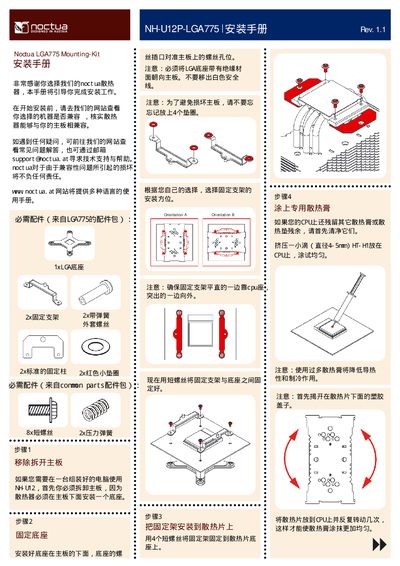
This guide explains how to prepare your motherboard, attach the base plate, and secure the mounting brackets for the Noctua NH‑L12P cooling solution. It lists the required parts, shows the correct orientation of the base, and provides tips for applying thermal paste.
After the base is fixed, the guide details how to mount the brackets, attach the heat‑sink, and perform final checks such as ensuring the brackets are level and the screws are tightened properly. Compatibility information and support contacts are also included. This manual is written in Chinese.
| Thermal paste amount | 4‑5 mm diameter |
|---|
Check the compatibility list on Noctua’s website before starting the installation.
The kit includes eight short screws and two longer screws for securing the base and brackets.