
This user guide introduces the basic operating methods of Philips phones, including turning on, turning off, unlocking the screen, locking the screen, sliding the standby screen, entering the main menu, accessing the application menu on the standby screen, pulling down the menu bar on the standby screen to open the task manager and the notification list, adding the application icon on the standby screen, deleting the application icon on the standby screen, quickly switching the phone's scene mode, viewing the call log, dialing a phone, answering a call and rejecting a call.
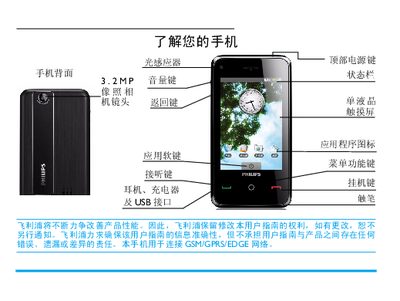
This manual explains how to power the Philips V808 mobile phone on and off, unlock and lock the screen, navigate the standby screens, and use core functions such as calling, messaging, contacts, camera, and internet browsing. It also covers scenario mode selection, task manager usage, and customization of the home screen.
Additional sections describe the device’s hardware specifications, SAR safety limits, warranty terms, and environmental compliance. The guide includes troubleshooting tips and details on battery charging, SIM and micro‑SD card insertion, and accessory usage. This manual is written in Chinese.
| Camera resolution | 3.2 MP |
|---|---|
| Network type | GSM/GPRS/EDGE |
| Maximum SAR | 0.345 W/kg |
Press and hold the top power key for a few seconds to power on the device.
Short‑press the top power key while on the standby screen to lock the phone and enter sleep mode.
Long‑press the top power key to open the device options list, then select the desired scenario mode such as normal, vibrate, silent, outdoor, or flight mode.