
This document is the user manual for the expansion cordless handset (BCL-D90BK and BCL-D90WH). It provides information on the specifications, usage, and precautions of the handset and its accessories.
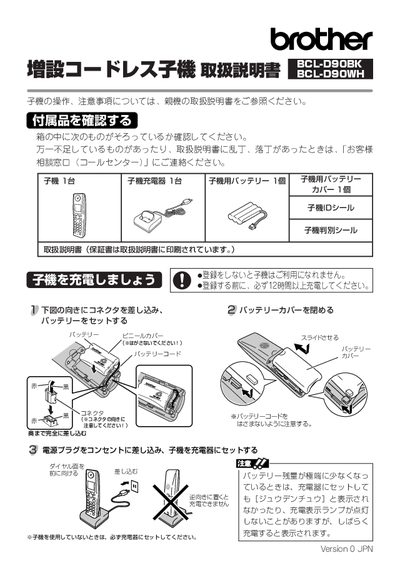
The manual explains how to check the included accessories, register up to four cordless handsets with the parent MFC unit, and re‑register or delete handsets when needed. It also shows how to label each handset with the parent unit’s ID number.
Additional sections cover battery type and recycling, safety symbols and precautions, frequency and transmission range, and the warranty terms for the handset and its accessories. This manual is written in Japanese.
| Battery type | Rechargeable NiMH |
|---|---|
| Operating frequency | 2.40 GHz – 2.4835 GHz |
| Maximum transmission distance | 80 m |
| Maximum number of handsets | 4 (including the one supplied with the parent unit) |
Up to four handsets can be used, including the handset that comes with the parent unit.
From the parent unit select Initial Setup → Delete registered handsets and confirm the deletion.
Write the parent unit’s ID number on the handset ID label and attach it to the battery cover.
The handset operates on the 2.40 GHz to 2.4835 GHz band.