
This document introduces the features and characteristics of the AMDG-X/E501 series motor protection devices, including protection functions, applicable range, working voltage, power consumption, acquisition accuracy, ambient temperature, relay contacts, DO/DI voltage, DO drive capacity, etc.
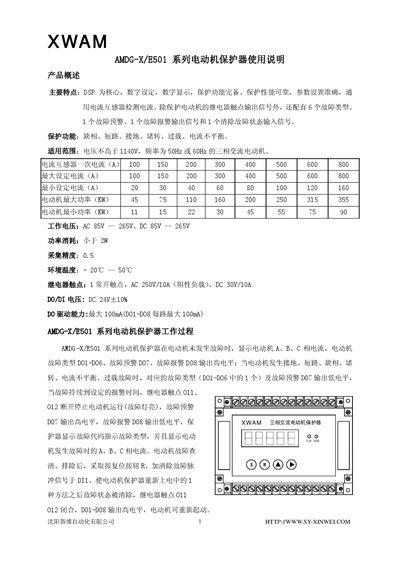
The XWAM AMDG‑X/E501 series motor protector provides comprehensive protection for three‑phase AC motors up to 355 kW. It uses a DSP core with digital settings and displays, offering fault detection for phase loss, short‑circuit, ground fault, jam, overload and current imbalance.
The manual describes the LED display, keyboard functions, parameter setting procedures, fault codes, wiring diagrams for relay and PLC connections, and installation dimensions. It also lists the default protection times and how to enable self‑reset functions. This manual is written in Chinese.
| Working voltage (AC) | 85 V – 265 V |
|---|---|
| Power consumption | < 2 W |
| Measurement accuracy | 0.5 |
| Operating temperature range | -20 °C – 50 °C |
| Relay contact rating | AC 250 V/10 A (resistive), DC 30 V/10 A |
| DO/DI voltage | DC 24 V ± 10 % |
| DO drive capability | max 100 mA per channel |
| Current transformer primary rating options | 100 A, 150 A, 200 A, 300 A, 400 A, 500 A, 600 A, 800 A |
| Maximum motor power supported | 45 kW – 355 kW |
| Short‑circuit protection time | 0.3 s |
| Ground‑fault protection time | 0.6 s (current > set value) |
| Phase‑loss protection time | 0.6 s (current > set value) |
Press the R (reset) key; this re‑initialises the microcontroller and stops the motor. The reset should not be used while the motor is running normally.
Select parameter 2 (overload protection time) with the M key, then adjust the value using the ▲ and ► keys; the range is 1‑300 (0.1 s units) and the factory default is 30.